
A mobile quote and invoice app earns its place when you can prepare a document, correct it and understand the final PDF without returning to a desk. Start with the finished document, then work backwards: were the client, lines, tax and terms right? Could you find the version you actually sent?
Below is a Devisly example using fictional details, followed by a short way to assess any mobile tool. The example shows specific actions in one mobile session; the questions are for your own device and circumstances.
Where do you prepare your documents?
If you draft quotes at your desk and only read PDFs while travelling, a desktop template may serve you well. If you need to prepare or amend a quote after a client meeting, try the complete workflow on the phone you normally carry.
“Mobile” can mean an installed app, a website that works on a small screen, or a Word or Excel file opened on your phone. Each can be useful. The label alone says nothing about offline access, how easy a line is to correct or how the exported PDF looks. Microsoft offers Word and Excel mobile apps and explains how to save a PDF on a mobile device. For a wider comparison, see Word, Excel or quote software.
What to check on your phone
| Question | Why it matters |
|---|---|
| Can you read and correct every service line? | A helpful first draft still needs your approval. |
| Can you check the client and commercial terms? | Correct totals alone do not make a usable quote. |
| Can you open the exported PDF? | The recipient sees the document, not the editing screen. |
| Can you find the saved draft and issued document later? | You need to know which version is current. |
| What works with your connection and plan? | Features and limits can vary by offer and device. |
A mobile example: from description to a €2,200 quote
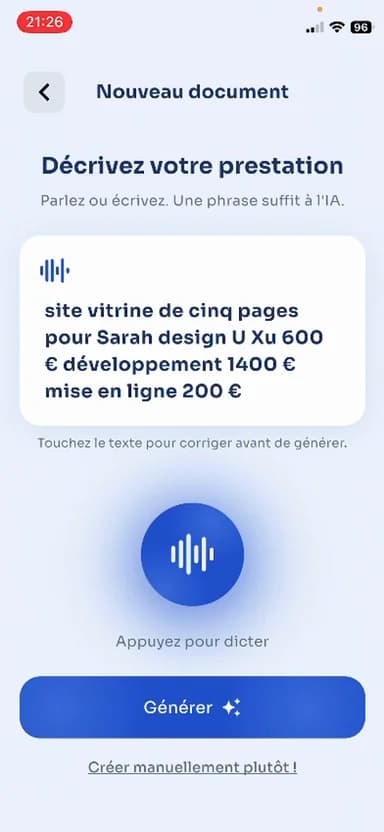
In the Devisly example, a fictional client requests a five-page website. The description sets out three services: design at €600, development at €1,400 and publishing at €200. The interface shown is in French; the names and contact details belong to the fictional demonstration.
The three screens show the description being entered, generation in progress, and the proposed lines ready to review. The first proposed label is then changed to “Design UX/UI” before the quote is produced. This is a correction to the wording of a line, with its price remaining €600.

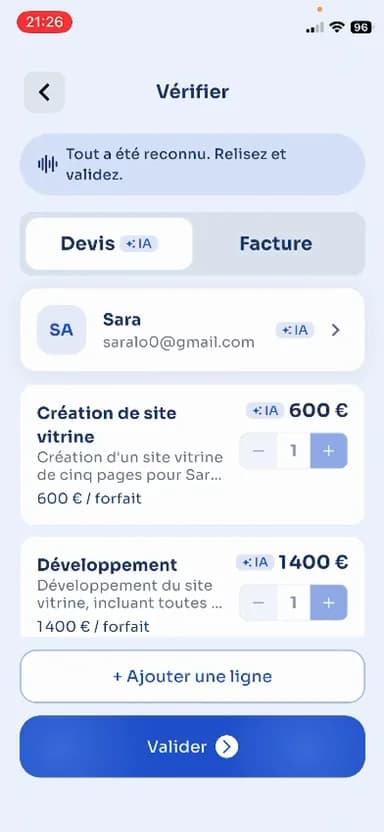
The resulting quote lists Design UX/UI (€600), Development (€1,400) and Publishing (€200). That is €2,200 excluding VAT. With the 20% VAT selected in this example, VAT is €440 and the total is €2,640 including VAT. The rate shown here is an assumption of this example, not a rate to copy without checking your own situation.
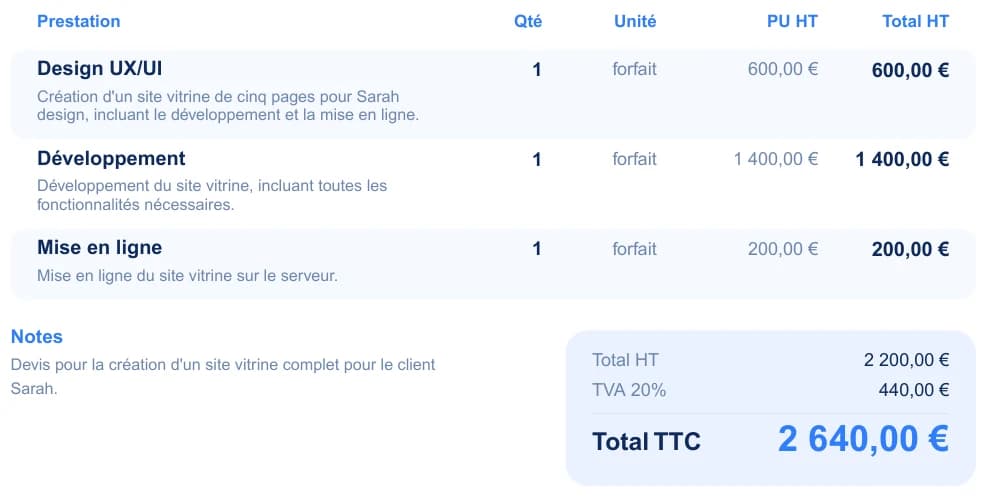
Download the complete example quote — PDF. Read it as the output of this fictional workflow, not as a ready-made template for your own legal or tax situation.
What happens after the quote?
The same mobile session goes on to show the quote marked as accepted in the app and converted into an invoice. That invoice references the quote and carries the same three amounts, though the line order and payment terms differ. Marking a status in an app does not itself establish that the customer accepted the proposal; keep the actual agreement in your records. Before sending an invoice, check its number, dates, parties, payment terms and the rules that apply to your transaction.
The images focus on preparing the quote; the later invoice step is described above. Before choosing the app, check its current features on your own phone and plan, particularly offline access and document retrieval.
A short test before choosing an app
Use a fictional client and a small, familiar service. Prepare a draft, then deliberately correct one description or price. Check that the final PDF reflects the correction. Close the app, return to the client and locate the right version. If you intend to invoice from a quote, check that step separately and make sure your records still show what the client agreed to.
If connectivity is uncertain where you work, check which actions require a connection: viewing, editing, saving, generation and exporting may have different requirements. Check how to retrieve your documents if you leave the service.
Mistakes to avoid
- Sending suggested lines without reading their description, quantity and price.
- Treating a correct total as proof that the client details and terms are correct.
- Assuming “sent” means received, or an internal “accepted” status means the client agreed.
- Copying the VAT rate or wording from an example into a different business situation.
- Judging the editing screen without opening the PDF your customer will receive.
Where Devisly fits
Devisly's mobile app can turn a description into proposed quote lines that you review, edit and use to prepare a PDF. The recorded example also shows conversion from quote to invoice. Those observed steps make it a candidate if you prepare service documents away from your desk. Try the other operations that matter to you with your own app version before moving your documents across.
Examine the Devisly mobile app
Check the version available to your phone and test a draft using fictional details.
Related reading
- Word, Excel or quote software: which workflow fits you?
- A service quote example with scope, prices and terms
- Turn a quote into an invoice without retyping it
Frequently asked questions
Is a free tool enough to start?
It may be, if the included functions cover your workflow and you can retrieve your documents. Check the limits on documents, exports and client records before depending on it.
Do I need full accounting software?
Preparing a quote on your phone does not by itself answer that question. List your needs for documents, bookkeeping and electronic invoicing separately, then find out which services cover each one.
Choose the workflow you can check
The strongest mobile workflow is one where you can correct the proposed work, verify the document, keep the customer's agreement and find the right version later. The example shows what that can look like; your own test tells you whether the app fits your work.
Enough reading. Send your next quote straight from the job.
Dictate what you’re billing for. Devisly prepares the quote or invoice. You review it, then send it.